← All help articles

Initial Access to Visits in the Ankota Caregiver NextGen App

Visits

Initial Access

In Visits, you will see a list of your visits for the day. You will also have the option to change the date range if desired to see a larger time period.
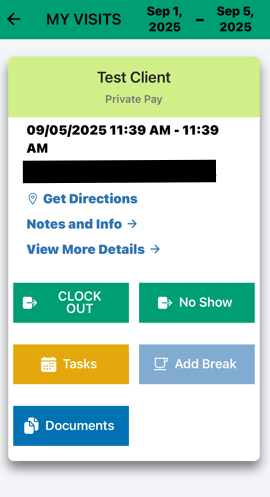
  

The My Visits screen displays a scheduled visit for Test Client on 09/05/2025 from 11:39 AM - 11:39 AM, with action buttons including Clock Out, No Show, Tasks, Add Break, Get Directions, Notes and Info, View More Details, and Documents.


Please note that each visit has details which can be reviewed in advance. 

One way is to click Notes and Info, this will drop down a box that will show specific information about the client. For example: client is allergic to peanuts. Note: this is a special feature that would be requested by your Administrator.
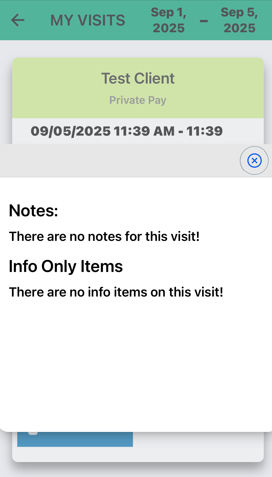
The visit details screen shows a client appointment for "Test Client" (Private Pay) scheduled for 09/05/2025 from 11:39 AM to 11:39 AM, with sections for Notes and Info Only Items that currently contain no entries.

The first is the "View More Details" link. If you click this location, you will see extensive details, up to and including a link to Google maps for directions.
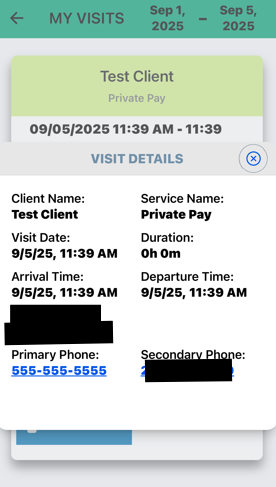
The Visit Details screen displays information for a client visit, showing the client name "Test Client," service type "Private Pay," visit date and time "9/5/25, 11:39 AM," duration "0h 0m," and contact information including a primary phone number. The screen is part of the Ankota Caregiver NextGen App and shows visit-specific details within a date range of September 1-5, 2025.


You also have the option to Clock In or preview tasks ahead of time. Please note that while tasks can be previewed in advance, they cannot be reported until you've Clocked In.

Was this article helpful?
On this page