Scheduling Back-to-Back/Contiguous Visits
Overview
Scheduling back-to-back visits is a simple process in Ankota. To ensure two back-to-back visits flow from one visit into the next:
- Schedule two visits of different visit types (for example, Personal Care and Respite) in the same department
- Assign the two visits to the same caregiver and client
- Schedule the two visits without a time gap in the middle (end time of first visit = start time of second visit, like 07:00–09:00 / 09:00–10:00)
- Both visits must be scheduled before the caregiver clocks into the first visit. If the second visit is added after the caregiver has clocked into the first visit, the two visits will not be treated as one visit. In that case, the caregiver must clock out of the first visit and into the second new visit.
See below for further information on the advantages and details of back-to-back scheduling in Ankota.
Simple Clock-in, Clock-out
Back-to-back visits (also referred to as contiguous visits) are scheduled without any time between them. For example, 8:00 a.m.–9:00 a.m. Personal Care followed by 9:00 a.m.–10:00 a.m. Respite. (In other states, the second visit might be "Attendant Care" or "Homemaking.") The Ankota system allows the caregiver to clock in at the start of the first visit (8:00) and clock out when finished. The first visit will automatically transition at the appropriate duration to the second visit. In other words, even if the caregiver clocked in half an hour early, the Ankota system would correctly transition billing after the appropriate duration from the first visit type to the second visit type.
For example, a caregiver clocks in at 7:49 for an 8:00 a.m. one-hour Personal Care visit followed by Respite at 9:00. At 8:49, one hour after they began, the system will automatically close the first visit and begin billing the second visit, which is now in the status of Arrived. The caregiver works until 9:50, at which time they clock out. The system appropriately records the caregiver's work times at 7:49–8:49 Personal Care, 8:49–9:50 Respite, even though the caregiver only clocked in one time and only clocked out one time for the two back-to-back visits.
Short "Safety Net" Second Visits & Automatic Closure of Unbillable/Unpayable Visits
IMPORTANT: This scenario works best with companies that pay actual time worked. If caregivers are paid only up to the length of the scheduled visit, schedule a longer second visit, or change the scheduled visit length during the Visit Approval Dashboard review. Virginia clients should review the Virginia-specific article.
In some states, the second visit is used more as a safety net. In this scenario, visit type one is expected to be fully scheduled with the services delivered as close to 100% as possible, while the second visit is more of a safety net in case services need to go long some days to avoid overbilling the first, primary service.
As in the above scenario, two visits are scheduled back-to-back without any time between them. The difference is that the second visit, the "safety net," is not scheduled with the expectation that it will be fully completed. It is typically scheduled as a short safety net of 15 minutes.
This 15-minute visit ensures that if the caregiver does have to work longer, the extra time will be billed to the second visit type. If the caregiver does not work longer, it will be canceled.
Example A — Unbilled Second Visit (unused second visit)
- SCHEDULED: Personal Care 8:00 a.m.–9:00 a.m. + 9:00 a.m.–9:15 a.m. Respite, 1 hour 15 minutes duration
- ACTUAL: 7:55 a.m.–8:45 a.m., 50 minutes duration
- BILLED/PAID: Personal Care = billed and paid 50 minutes (rounded if the company rounds); Respite = not billed, not paid
Example B — Billed Second Visit (appropriate billing of both visits)
- SCHEDULED: Personal Care 8:00 a.m.–9:00 a.m. + 9:00 a.m.–9:15 a.m. Respite, 1 hour 15 minutes duration
- ACTUAL: 7:55 a.m.–9:55 a.m., 2 hours duration
- BILLED/PAID: Personal Care = billed and paid 1 hour; Respite = billed and paid 1 hour
On Hold Caregiver Closure of Contiguous Visits
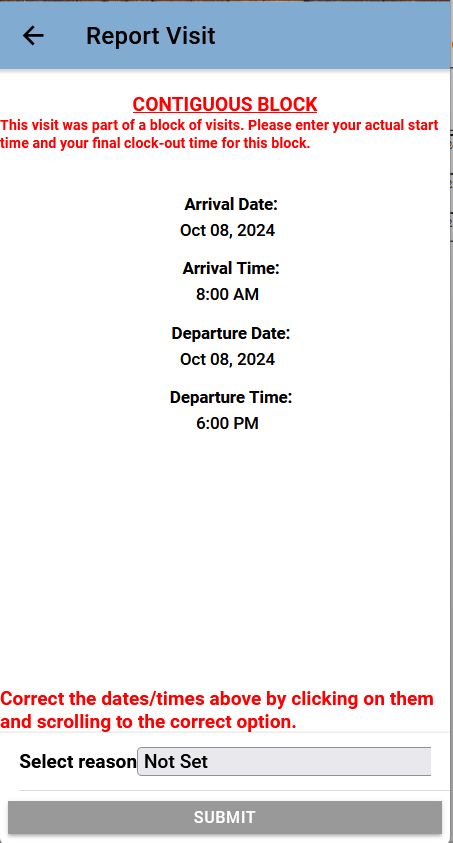
Contiguous visits that are returned to caregivers as On Hold visits (see the On Hold manual caregiver closure feature documentation) allow users to report their times in a single visit. The On Hold visit will also indicate that the entry is for a contiguous block of 2 or more visits. (For example, a combination of an 8–4 Personal Care and a 4–6 Respite.)
Based on the reported duration, the minutes and care plan items will be correctly divided.