Adult Day Workflow
Overview
This article focuses on Adult Day Care management in Ankota.
It covers:
- Set-up
- Clock-ins and Clock-outs (including Transportation)
- Pre-Billing
- Testing
- Billing Management
- Further Details
Ankota environments with Adult Day Care management have a unique workflow. This article primarily focuses on Adult Day in general; for state-specific guidance, see the individual state guide. This article describes the general administrative experience of setting up an Adult Day organization in Ankota in list form. For deeper detail on each process, follow the linked resources.
Set-up
Service Set-up
Note: If providing both Medicaid and Private Pay services, or services to a variety of LTC insurance companies, Payer Descriptors must be used. Each client requires a payer descriptor assignment, and payer descriptors will be applied to visit types.
In addition to the usual confirmations of billing rates, pay rates, visit types, payers, and any state reporting requirements, the following must be provided or decided for Adult Day organizations and discussed with an implementation specialist:
Lists to Provide
- A list of facilities
- A list of activities
- A list of visit types and rates
- A list of current billing methods and billing goals
- If performing a data upload rather than manual entry, lists of:
- Clients (Client Data Excel Template - VERSION NO SKILLS.xlsx)
- Caregivers (Caregiver Data - Excel Template)
Decisions to Make
- Signature requirement: arrival yes/no? departure yes/no?
- Whether to use drop-down categories of Adult Day care plan items
- For example, Adult Day Morning, Adult Day Afternoon, Adult Day Special Events, etc.
- Ideal for companies with many different care plan items — makes navigation easier
- Scheduled or Unscheduled Visits?
- Bill by visit type, payer, or client?
- For private pay clients, bill via credit card or ACH processing via Paragon?
- Pay standard hourly rate, per visit rate, or other?
- Mapping/Transportation management needed?
- If so, use generic "driver" log-ins?
- Advantage: less frequent reassignment, easy sorting, easy to set office locations for each driver across multiple facilities
- If drivers have set schedules rather than a rotation, individual log-ins may be preferred
- If so, use generic "driver" log-ins?
- Caregiver shifts (scheduled or unscheduled) managed in Ankota or in another system?
- Client self check-in, Family check-in, or Staff check-in?
- Single "kiosk" user log-in for Adult Day check-ins, or individual staff log-ins? (This is separate from administrative access, which is always individual.)
Once these items have been reviewed and configured by the implementation specialist, system data entry can begin.
Data Entry
- Client entry, including authorizations, care plans, and schedules (add client schedule limitations if needed)
- Caregiver entry
- Facility assignment:
- Clients to facilities (so they can clock in to those facilities)
- Staff and/or caregivers to facilities (for viewing access)
- Document entry (Ankota can add documents provided to them)
Clock-ins and Clock-outs
Relevant guides:
- Staff guide to managing client clock-ins and clock-outs
- Administrative guide to managing Adult Day visits, including schedule board overview
- Staff guide to clocking in and out of office shifts
- Activity management guide
- Transportation management guide
Pre-Billing
Successful billing and payroll start at client creation. The following processes lead to successful billing:
- Client and Caregiver entry
- Visit Management
- Caregivers complete visits, or timesheets are entered manually through the office
- Visits are approved automatically, or visits are approved by the office. Ensure visits are closed, then review and clear the Visit Approval Dashboard
- Prevention of Errors/Unmatched/Rejected Claims
- Watch warnings on the Action Center (such as missing client IDs) and address as needed
- Watch warnings on the Visit Approval Dashboard and address as needed
Testing
Testing processes are typically not needed for private pay. Consult an Ankota specialist for any state-mandated data delivery that requires testing.
Billing/Payroll Management
Billing and payroll are simple if the pre-billing practices above are followed.
To bill:
- Schedule visits as usual
- Clients clock in and out as usual
- Manage visits as usual
- Ensure visits are closed (assuming visits are scheduled in advance)
- Review/approve visits in the Visit Approval Dashboard
- Bill visits as usual
- Calculate Billing
- Review the Billing Report (Client) and complete invoices
- For private pay customers, email invoices or print and mail invoices
The Landing Dashboard highlights necessary actions, including managing visits as needed.
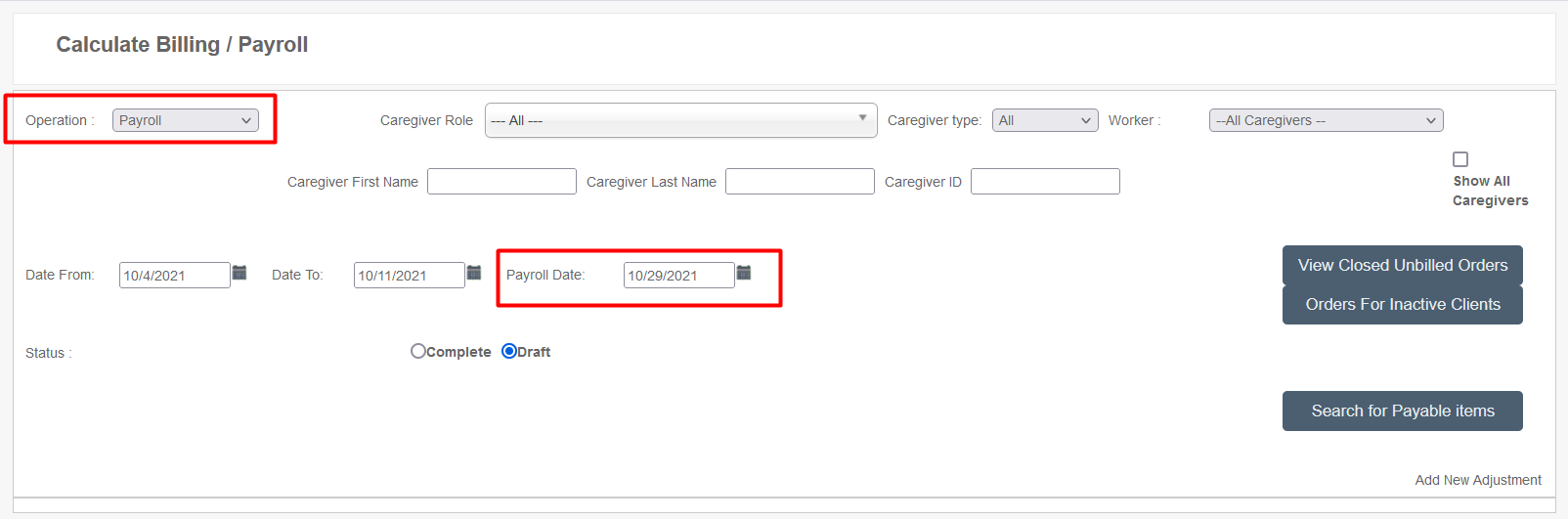
The payroll process is the same as above, except select Operation: Payroll on the Calculate Billing/Payroll page and set a payroll date to associate with the payroll.
Further Details
Additional resources:
- Ankota Training Overview (including videos)
- Daily Adjustments
- Manual Visit Entry
- The Attendance Report
- Client Data Excel Template