Caregiver Training Information
Overview
Caregivers need support during their transition to Ankota, and several resources are available to help.
Extended Training
The complete extended caregiver training resources are housed in the Caregiver Resources HelpSite, which is a separate site from the administrative site. For more information on the mobile app from an administrator's perspective, see "The Ankota Caregiver Mobile App - Admin Perspective." For the caregiver's perspective, see the Ankota Caregiver NextGen Mobile App HelpSite.
Standard Training
A short standard training video is available: "How to Send Caregivers Their Training Information and Log-ins."
The standard training covers these steps:
- Send a notification of the Ankota switch (see text message template below) using the Send Message feature.
- Send a message with training information.
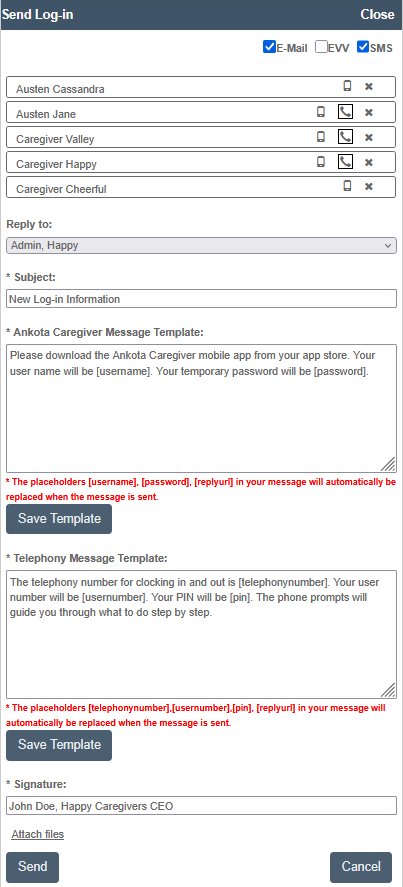
- Use the Send Log-in button to send caregivers their log-in information.
- Send additional notifications only if needed.
It may help to start these messages with a note such as "Important [Your name] employee update" to ensure caregivers read the notification.
Initial Communications - Templates/Examples
Notifying caregivers of the switch to Ankota can be done in three steps. Pre-written templates are provided below.
1. Notification of Ankota Switch
Mobile App Only
Exciting news - we are switching to Ankota for our mobile app! Please watch for additional messages after this. They will include your user name, password, and Ankota training links. You will also receive text reminders from time to time from this new phone number.
Mobile App and Telephony
Exciting news - we are switching to Ankota for our mobile app and telephony! Please watch for additional messages after this. They will include your user name, password, and Ankota training links. You will also receive text reminders from time to time from this new phone number.
2. Send Training
Full Portal Training (mostly for nurses)
We have a training course for you! Please log in and watch the mobile app videos to learn about/review these features in the Ankota mobile app. Go to: https://ankotatrainingacademy.thinkific.com/ and log in with USER: train@ankota.com PASSWORD: learningfast!
Generic Link Training (mostly for caregivers)
We are switching to Ankota for mobile app log-ins and log-outs. Download the Ankota Caregiver NEXTGEN mobile app from your app store. Look for your log-in name and password in a different text. Please watch these two videos, then practice logging in with your user name and temporary password.
Relevant videos:
- Short new video (ClickUp screen recording)
- Basic Caregiver Video (ClickUp screen recording)
- Special Features Video: https://s3.amazonaws.com/helpsite-uploads/yfsyrsg_t4ongurddpvepp2nogm%2FE-J0EvpCbIo1734120127680-COMPRESSED+FULL+LENGTH_Mobile+App+Special+Features.mp4
3. Send Log-in (built-in template)
To send caregiver log-in information, use the Send Log-in feature. This feature automatically writes in a template and includes each caregiver's user name and password in a text message to the caregiver. Each caregiver will only see their own user name and password.
Additional Announcement Templates
Documents Announcement (email template)
Good morning! We now have several new documents available on the mobile app. Documents are easy to fill out. After clocking in to a visit, simply click DOCUMENTS and choose a document to fill out. Some documents are always available on home care visits, such as the Incident Report form. Others are available by request or are only available on the appropriate visit.
Note: Documents must be configured (or contact Support to request configuration) prior to sending a documents notification; documents are only available once they are assigned to visit types. For customers who use documents, the Documents Overview page should also be configured, along with the Documents warning on each visit with completed documents on the Visit Approval Dashboard.
Progress Notes Reminder (email template)
Tomorrow is our monthly Progress Notes day. The form must be completed by end of tomorrow. This is a regular check-in, so this form is available on ALL home care visits. If you don't have an upcoming visit, contact Scheduling to request a Progress Notes visit so that you can fill out the appropriate form. AS ALWAYS, if your client has an incident (fall, injury, etc.), IMMEDIATELY fill out the appropriate form - do not wait for your monthly Progress Notes report!
Template Attachments
Streamlined walkthroughs can be attached to emails as needed:
- Mobile App & Telephony.pdf
- Telephony Guide.pdf
- Mobile App Guide.pdf