Client and Caregiver Export
Overview
Many states require data integrations, where EVV data is sent over to the state on a regular basis. For aggregators like HHAx and Sandata, a separate caregiver file is required as part of this process. For Sandata, a client file is also required. Normally, files are sent over during initial launch, and then every time that a new caregiver is added, the new profile is delivered to the end system at the end of the day.
However, sometimes these files are rejected. The most common reason is a profile is incompletely entered on its first day and then is delivered to the destination system missing required data, resulting in an error. In that case, the profile should be exported again when it is complete. Any visits already completed may also need to be re-sent to ensure they are accepted.
Using the Caregiver Export Function
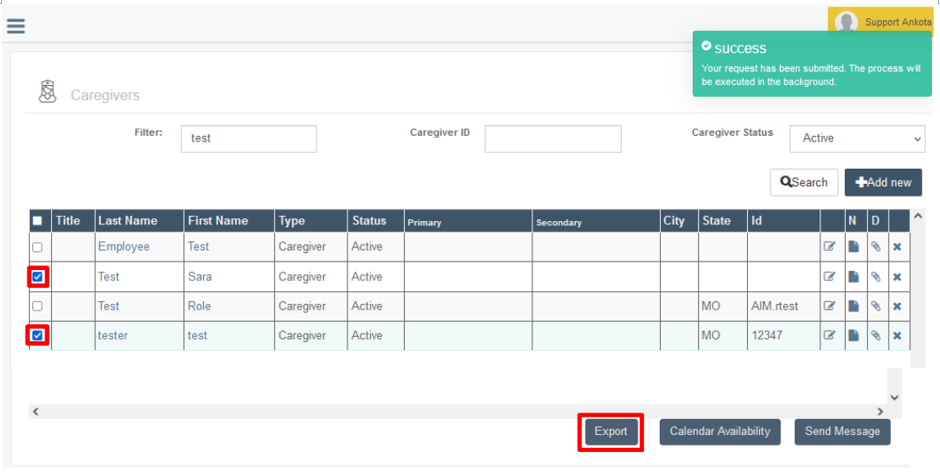
To use the caregiver export function, go to the Caregivers page, then click Search. Check the box next to each caregiver to export (or check all with the "check all" box at the top), then scroll down. Click the Export button.
The selected caregiver(s) will be exported.
Note: If the caregiver's visits also need to be re-sent, wait until the next day, then send the visits either through batch redelivery (re-completing the invoice) or individual visit export, as preferred.
Using the Client Export Function
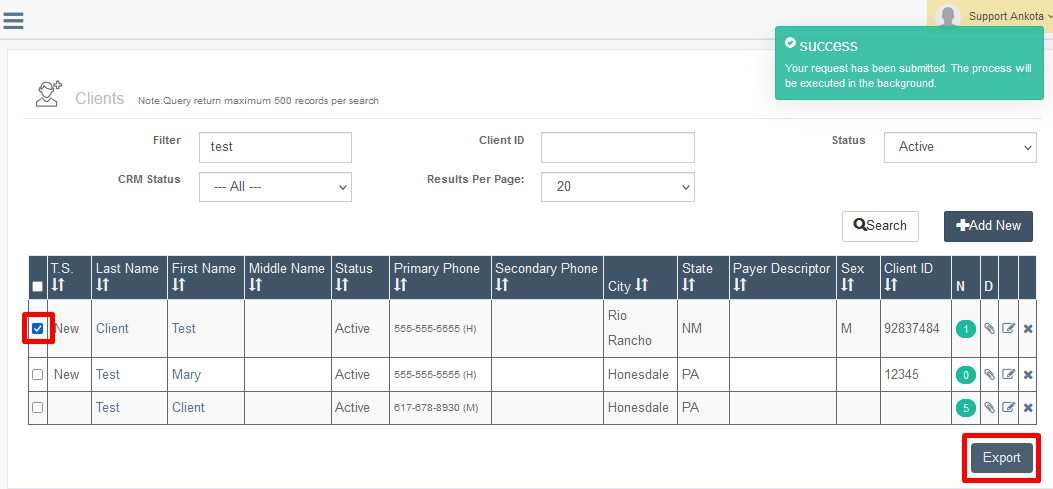
To use the client export function, go to the Clients page, then click Search. Check the box next to each client to export (or check all with the "check all" box at the top), then scroll down. Click the Export button.
The selected client(s) will be exported.
Note: If the client's visits also need to be re-sent, wait until the next day, check the response file to see if the client update was successful, then send the visits either through batch redelivery (re-completing the invoice) or export via the Visit Approval Dashboard, as preferred. If the client update was not successful, check the error and make the correction before re-sending again.
Related
For more details on the lifecycle of exports and troubleshooting, see Managing Data Exports - Client/Caregiver Exports.