Navigating and Understanding Ankota Software›The Main Menu

The Main Menu

Overview

The Main Menu is the side menu in Ankota used to navigate and access notifications, clients, staff, caregivers, schedules, management tools, reports, and settings.

The Main Menu is customizable based upon the organization's needs, and may also vary according to user role. For questions regarding limiting or adding Main Menu items, contact an Ankota representative.

Example

Below is an example of how the Main Menu appears.
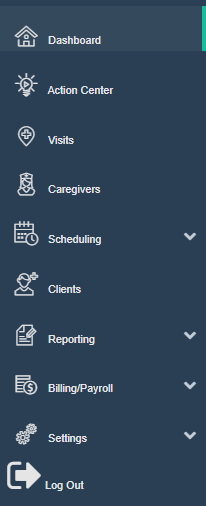
The screenshot shows the main navigation sidebar menu of a software application with various menu options including Dashboard, Action Center, Visits, Caregivers, Scheduling, Clients, Reporting, Billing/Payroll, and Settings, each with corresponding icons. Several menu items like Scheduling, Reporting, Billing/Payroll, and Settings have dropdown arrows indicating expandable submenus, and a Log Out option appears at the bottom of the menu.

Video

Was this article helpful?
On this page