Cancel/Delete Previously Accepted Visits + Export Feature
Overview
Some aggregators allow for special resolutions to previously exported and accepted visits. For organizations where these buttons are useful, this button is configured. The options are generally clear, but additional notes are provided below.
Cancel/Delete & Export Button
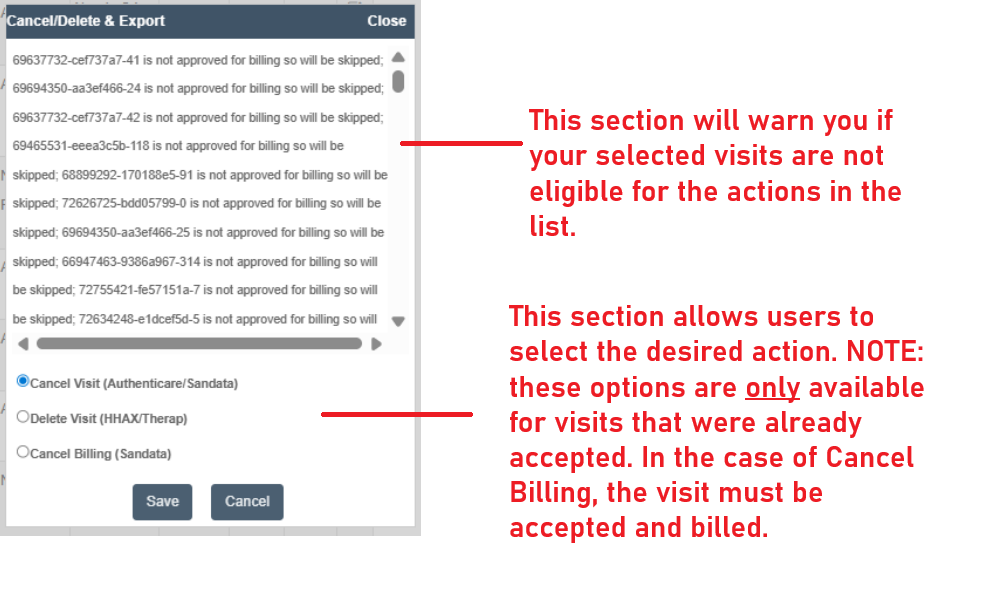
After selecting visits on the Visit Approval Dashboard, this button creates a pop-up where users can select their next step when it is clicked.
Three options are provided:
-
Cancel Visit (Authenticare/Sandata)
-
Delete Visit ((HHAX/Therap)
-
Cancel Billing (Sandata)
Each option works as described. After selecting one of the radio dials, you can click Save to take the action.
Keep in mind the following:
-
The top section will list selected visits if they are not eligible for the actions below
-
The bottom section is only for eligible visits
-
Eligible visits must be:
-
Previously accepted (or otherwise there is no need to send the delete/cancel command)
-
In the case of Cancel Billing, the visit must be previously accepted and billed
-