How To Set Bill Rates
In order to set a new bill rate, the steps would be as follows:
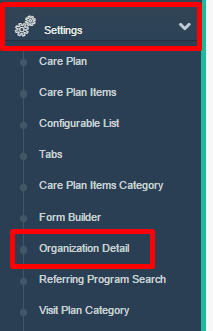
- Go to Settings from the Main Menu and select "Organization Detail".
- Click the "Billing Configuration" and "Bill Codes" tabs.

- Look to see if the billing rate you need is already set. If not, follow these steps:
- Click "Add New Bill Code"

- Set the name such as Bill4.00.
- Best practice is to set per unit as example above ("Bill4.00") and per hour as "BillPH16.00" and per visit such as BillPV45.00 where PH = per hour and PV = per visit.
- Set Units as 1.
- And choose the appropriate charge type.

- Next set the time unit criteria.

- Lastly set the rate amount and Save.
- Example for rate would be 4.00 for $4.00 - do not enter the leading $.

After a billing rate has been set, you will then attach it to a visit type. To do this,
- Go to Settings and Visit Type

- Select a visit type that you want to attach the new bill code to.
- Under Bill Code, set the appropriate Bill Code and Save.

Was this article helpful?