Illinois Workflow
Overview
(As always, private pay is generally self-regulating within the confines of state law and regulatory processes. This article focuses on Medicaid billing in the state of Illinois.)
In the state of Illinois, there are some unique billing processes. This is because select Medicaid visits must be completed using electronic visit verification (EVV), and these verified visits are required to be sent to Sandata. Certain MCO users will instead be required to be sent to HHAx if applicable effective March 2026. For Ankota users, that means in addition to regular EVV services, Ankota also delivers appropriate visit data to the appropriate location to ensure the state's requirements are met.
Note: categories DHS/DRS and Elderly DoA are currently sent to Sandata.
This article covers:
-
Set-up
-
General Resources
-
Sandata Set-up
-
HHAX Set-up
-
-
Testing
- HHAX Testing
-
Pre-Billing
-
Billing Management for Medicaid Visits
-
HHAX Billing
-
Remittance Advice Management (835s)
-
-
Corrected Claims
- HHAX Claim Correction
-
Further Details
Set-up
General Resources
-
Community Care Program Overview
-
Home and Community Based Services Waiver Programs
-
FAQ for Community Care Program Billing and Reimbursement
-
Provider Responsibility/Administrative Code for Community Care Program (including Vendor Request for Payment, or VRFP, requirements)
-
Phone numbers for Illinois Medicaid
-
Illinois HHAX at ILsupport@hhaexchange.com and 833-961-7429
-
Illinois Medicaid Healthcare and Family Services Contact: hfs.evv@illinois.gov
General Contact information for DHS:
-
DHS EVV Website - DHS EVV
-
DHS EVV Email - dhs.evv@illinois.gov
-
DHS EVV Help Line - 1-888-713-5139 (1-888-575-0531 TTY)
-
DRS Local Offices - search the DHS Office Locator
MCO Contacts:
-
Aetna HealthChoice Illinois (HCI) General Authorization Inquiries: UMInquiryABHIL@AETNA.com
-
EVV Authorization File: darnelln@aetna.com
-
Aetna Medicare-Medicaid Alignment Initiative (MMAI): AetnaILMMAIEVVCompliance@aetna.com
-
Blue Cross Blue Shield (BCBS) HCI and MMAI: LTSS_SupportCtr@bcbsil.com
-
CountyCare HCI: countycare.evv@cookcountyhealth.org
-
Humana MMAI: ILMMAI-LTSSCM@humana.com
-
Meridian HCI and MMAI: MeridianEVV@centene.com
-
Molina HCI and MMAI: ltsseti@molinahealthcare.com
CRITICAL NOTE: Customers must complete their registration with Sandata and HHAX with Ankota listed as their alternate EVV provider in order for Ankota to connect and deliver EVV data. No data delivery can be completed without this completed registration.
Sandata Set-up
Programs/Visit Plan Categories DHS/DRS and Elderly DoA go to Sandata.
Registration
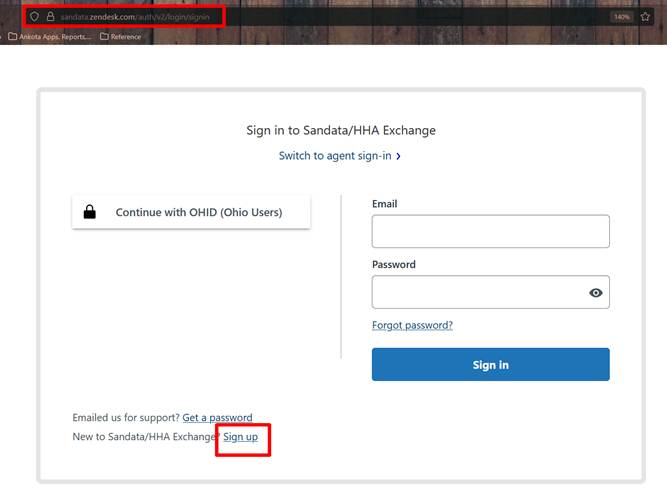
First, create a new log-in by going to https://sandata.zendesk.com/auth/v2/login/signin and clicking "sign up"
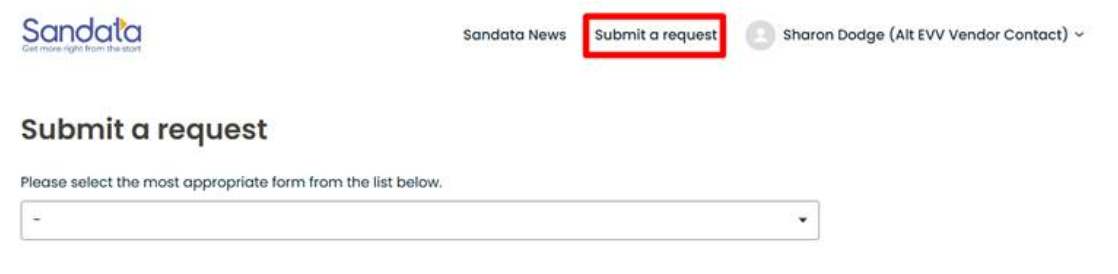
Once logged in, click "Submit a Request" to access the request webform
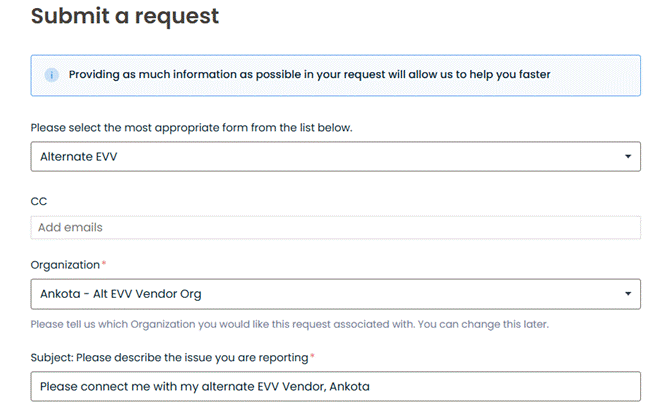
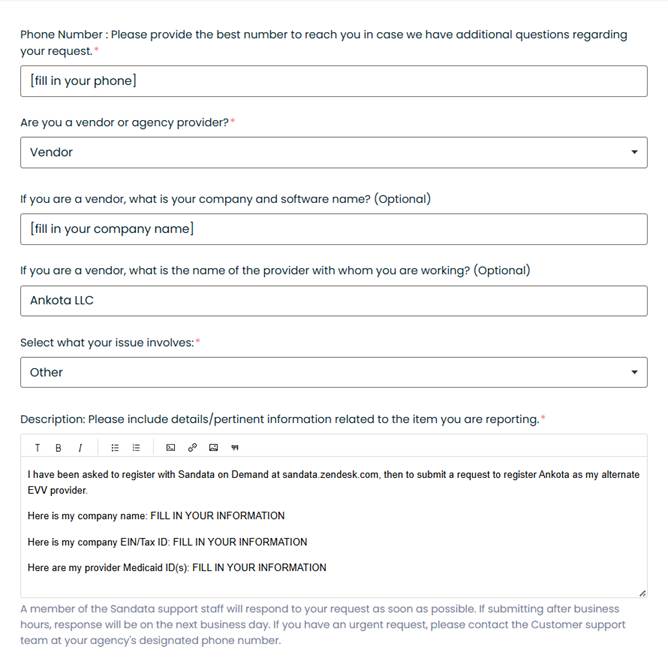
Finally, complete a webform request to register Ankota as your EVV vendor. It is recommended to include the company name and IDs in the Description section of the request.
Caregiver & Client Requirements
HHAX Set-up
Most visit types will be exported to HHAeXchange. Tasks 115-511 must also be sent to HHAX.
Visit Types Required
T1002, T1003, T1020, G0151, G0151 U2, G0152, G0152 U2, G0153, G0153, G0153 U2, G0299, G0299 U2, G0300, T1002, T1002 TU, T1002 TT, T1002 CR, T1003, T1003 TU, T1003 TT, T1003 CR, T1004 TU, T1004, T1005 TD TT, T1005 TE TT, T1005 TD, T1005 TE, S5150, G0299, G0299 U2, G0300, T1002, T1002 TU, T1002 TT, T1002 CR, T1003, T1003 TU, T1003 TT, T1003 CR, T1004, T1004 TU, T1005 TD TT, T1005 TE TT, T1005 TD, T1005 TE, S5150, G0299, G0299 U2, G0300, G0151 U2, G0151, G0152 U2, G0152, G0153 U2, G0153, T1002, T1003, T1020, T1002, T1003, T1020, T1002, T1003, T1020, G0151, G0151 U2, G0152, G0152 U2, G0153, G0153 U2, G0299, G0299 U2, G0300
Updated as of June 2024
Care Plan Items
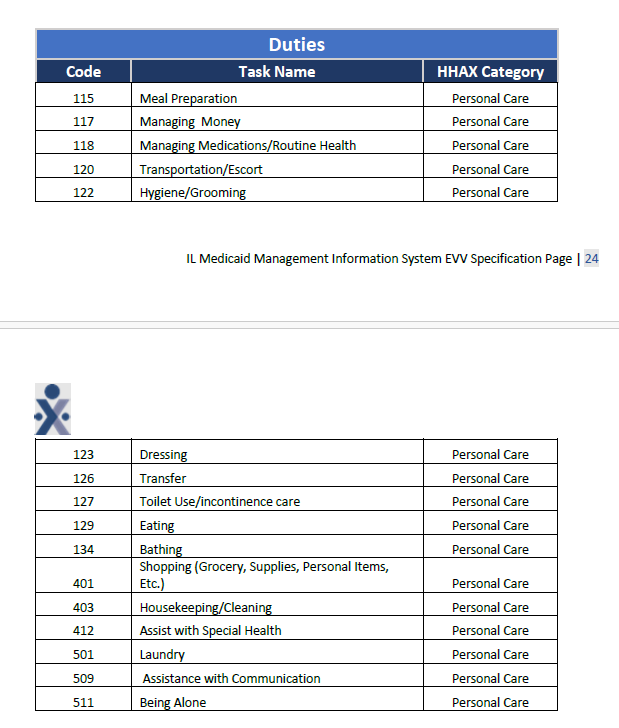
Those services are subject to the EVV mandate and must be delivered to HHAX. Internally, Ankota users are automatically set up for delivery of EVV visit data to the state as part of implementation, but registration ensures HHAeXchange will accept the data and give providers access to credentials and the HHAeXchange log-in.
Registration
To register with HHAeXchange, go to Third Party EVV Attestation - IL. You will need the following information:
-
Provider name: YOUR COMPANY NAME
-
Provider contact name and email address: NAME, EMAIL
-
Provider Medicaid ID
-
Provider Tax ID
-
Vendor name: Ankota LLC
-
Vendor address: 1 Franklin Street, Suite 360B, Boston, MA 02110
-
Vendor contact name & contact information: Sharon Dodge, COO, sharon.dodge@ankota.com, 844-4-Ankota, extension 703
If you want HHAx to bill your data, request that option.
Questions about IL EVV can be sent to dhs.evv@illinois.gov. Additional questions about HHAeXchange can be sent through the HHAX portal or call (866) 245-8337.
Credentials
HHAeXchange will provide credentials in return. Send Ankota the following information so that data can flow to the state:
-
Your HHAeXchange credentials
-
Any HHAeXchange communications
-
Your provider Medicaid ID, Tax ID, and taxonomy codes
Required Data
Illinois collects the following information (this is the information that MUST be added to your system prior to data delivery):
-
Type of service
-
Person Serviced
-
Dates of Service
-
Location of Service
-
(Reason & Action codes if needed)
-
Payer
-
Note: Illinois does NOT require program specifics
-
Name of Caregiver
-
Times of Service (start & end time)
Client data:
-
First Name Last Name
-
Medicaid ID in the Medicaid ID field OR ALTERNATE non-Medicaid ID in the second client ID field
-
Client address
-
Primary diagnosis code (this must be the diagnosis CODE, not the description, and it must be the code assigned by the state, not a general valid diagnosis code)
-
Relationship to insured
-
Plan Assignment (Medicaid, Blue Cross/Blue Shield, Champus, Commercial Insurance Co., Medicare Part B, Medicaid)
Caregiver demographic data:
-
First Name Last Name
-
DOB
-
SSN
-
Gender
-
Hire Date
-
ID & Matching Caregiver Code (do not skip the code UNLESS the caregiver should not send, like the Ankota Support caregiver)
-
Professional license number if possible
-
Gender
-
Role for Type: 'Both', 'Skilled', or 'Non-Skilled' (this is under Roles); no other Role is allowed by HHAx
-
Hire date
-
Valid email and phone format (if email and phone are entered)
-
Valid Address (State and 5-digit ZIP required)
Visit data cannot be sent until caregivers are successfully sent and received. Also make sure clients are on file with the state/HHAx per the payer. Per HHAx: "If you do not accept the [client] placements within a certain time frame they go to a pending queue...You do need to have someone check the system daily to accept new placements." Email HHAx if placements need to be re-set to pending. Clients must have active authorizations in order for client data to be accepted.
Effective 11/10/2026, S5130 visits in Ankota which are for the same visit type, client, and day will have an XE modifier automatically applied on the back end to meet new requirements announced.
In addition, HHAeXchange also introduced a TF modifier for agencies that offer employee insurance (an enhanced rate). If your agency offers employee insurance, please notify Ankota immediately so we can update your system.
Testing
HHAX Testing
No state testing processes are required for individual vendors at this time.
Pre-Billing
Successful billing starts at the beginning of the client's creation. The processes below will lead to successful billing.
Client Management
-
Client/Caregiver Entry
-
Setting Authorized Service for Clients (entering authorizations)
-
Schedule Visits - Calendar-Based Scheduling (or Creating Visits from Patterns)
Visit Management
-
Caregivers complete visits or timesheets are entered manually through the office
-
Visits are approved automatically or by the office
-
Ensure visits are closed, then review and clear the Visit Approval Dashboard ideally using the Approval Assistant
-
For HHAeXchange EVV visits:
-
apply Action Codes as needed
-
apply Reason Codes as needed
-
-
Note: 75% of all HHA visits in IL are expected to be EVV successful
Prevention of Errors/Rejected Claims
-
Watch warnings on the Action Center (for missing auths, primary diagnosis codes, IDs, etc.) and address as needed
-
Watch warnings on the Visit Approval Dashboard and address as needed
-
Ensure that name spellings, First Name/Last Name separation, Medicaid ID, and DOBs are entered correctly
-
Manage rejections
The Landing Dashboard will highlight necessary actions, including managing visits as needed.
Billing Management for Medicaid Visits
HHAX Billing
Currently, the listed services require EVV management and are sent to HHAeXchange. Group homes, DDD Supported Living Services (24-hour service), and self-directed personal care services do not require EVV at this time.
Process:
-
Complete the pre-billing process above
-
Bill visits as usual in Ankota
-
Do not bill overlapping months; for example, January and February visits should be in separate invoices
-
Separate out EVV and non-EVV visits to avoid unnecessary rejections from the state
-
Visit data is exported to HHAx upon billing in Ankota
-
Read imported response files (see section below)
-
Manage corrections
-
Re-send visits as needed, usually via the Visit Approval Dashboard
-
Release billing in HHAx
See the training video for more on releasing billing in HHAx. Once a visit is accepted in HHAx, if there is an issue, that issue must be corrected in HHAx.
Remittance Advice Management (835s)
Remittance advice files, or 835s, may be provided in response to filing Medicaid claims. These are essentially state receipts of payments. If provided, they can be uploaded to Ankota for automatic application of payments in the A/R records.
-
Process Remittance Advice (Upload 835 "receipts" received from MMIS into Ankota)
-
Post Manual Payments
-
Review Billing Reports
-
See also: Collections Report, Exceptions Report
Corrected Claims
Generally, claims corrections are handled one of two ways:
-
Update the claims in Ankota and re-send
-
Update the claims in the location where they were sent
HHAX Claim Correction
To correct claims that were rejected in HHAeXchange:
-
Review HHAeXchange response files
-
Correct the visits with errors as needed
-
Re-send visits from Ankota by the appropriate method, either:
-
single visit export
-
multi-visit export
-
Further Details
Additional resources:
-
The Ankota Training Overview, including videos
-
Daily Adjustments
-
Manual Visit Entry
-
Private Pay Workflow