Indiana Workflow
Overview
(As always, private pay is generally self-regulating within the confines of state law and regulatory processes. This article focuses on Medicaid billing in the state of Indiana.)
In the state of Indiana, Medicaid billing is fairly straightforward. The state Medicaid program, IHCP, is in the middle of a huge transition to EVV and using Sandata. Current MCOs are Anthem Blue Cross and Blue Shield, Humana Healthy Horizons, Molina Healthcare, United Healthcare Community Plan. They are using Sandata but will also require Netsmart and other aggregators/clearinghouses based on MCO in the future. More of this transition is documented here: Indiana Medicaid: Providers: Electronic Visit Verification. To subscribe for email updates, click here. The Indiana Medicaid email is EVV@fssa.in.gov. Select Medicaid visits are also required to be sent to the state's default aggregator, Sandata. For Ankota users, that means in addition to our regular EVV services which we provide, we will also deliver your visit data to Sandata to ensure your state's requirements are met.
This article covers:
- Critical Pathway
- Set-up Sandata
- Testing
- Pre-Billing
- Billing/Payroll Overview
- Imported Response Files
- Corrected Visits
- Further Details
Critical Pathway
For a simple overview of key admin system maintenance, see this overview with linked steps: Indiana Critical Pathway.pptx
Set-up: Sandata
Ankota users in Indiana must register with Sandata and with the state. This registration will ensure Sandata will accept their data and give providers access to the Sandata log-in. Internally, Ankota users are automatically set up for delivery of EVV visit data to the state as part of implementation.
To register with Sandata, providers must email Sandata the following information:
Subject: Request for EVV Vendor Certification (Ankota)
Body:
- Provider name: YOUR COMPANY NAME
- Provider contact name and email address: NAME, EMAIL
- Vendor name: Ankota LLC
- Vendor address: 1 Franklin Street, Suite 360B, Boston, MA 02110
- Vendor contact name & contact information: Sharon Dodge, Director of Implementation, sharon.dodge@ankota.com, 844-4-Ankota, extension 703.
You will also take EAS training. Sandata will provide credentials in return. Please send Ankota the following information:
- Any Sandata communications
- Your provider Medicaid ID and the categories and/or subdepartments they apply to
For help with the Medicaid Provider ID, contact Indiana Medicaid at EVV@fssa.in.gov. Please include your provider NPI and full business name.
In addition to the standard set-up of adding clients, caregivers, authorizations, care plans, and scheduling visits, Indiana Medicaid providers will want to ensure the following is available in their system:
Caregiver
- Caregiver ID
- Caregiver Code — Copy the caregiver ID into the caregiver code for all active caregivers. This enables delivery of your caregivers to Sandata. Do not assign a caregiver code to "fake" caregivers, such as Ankota Support.
- Caregiver SSN — if you do not wish to use the SSN, you'll need to enter a unique ID in the SSN field (a unique second ID is required by the state, with SSN strongly recommended)
- Caregiver Email
- Requires "@" and an extension, such as ".com"
- Must be unique
- Can be a private email or a company email
Clients
- Client ID
- Client Medicaid ID in the client's Medicaid ID field (even if it is already in the client ID field)
- Client date of birth (DOB)
- Client address — Home, Business, or Other; almost always Home
- Client phone — if a phone is entered, it must be labeled Home, Mobile, Business, or Other
- Payer Descriptor
Company
- Medicaid Provider ID (provide this to Ankota if you have not already)
- Make sure you are aware of all of your Medicaid Provider IDs
- Be sure to complete the EAS training; this triggers the release of your credentials to Ankota (data can not be sent without credentials)
- Company email at the Org. Details level
- An email for each administrator
Per the state, the following services require the use of EVV:
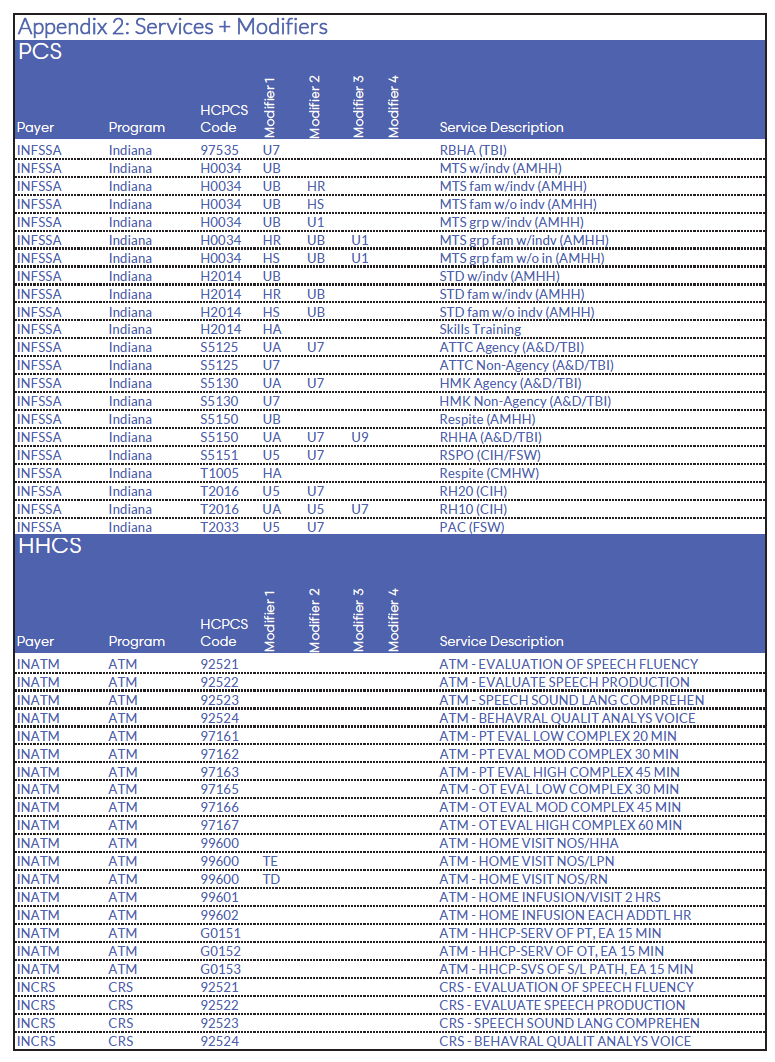
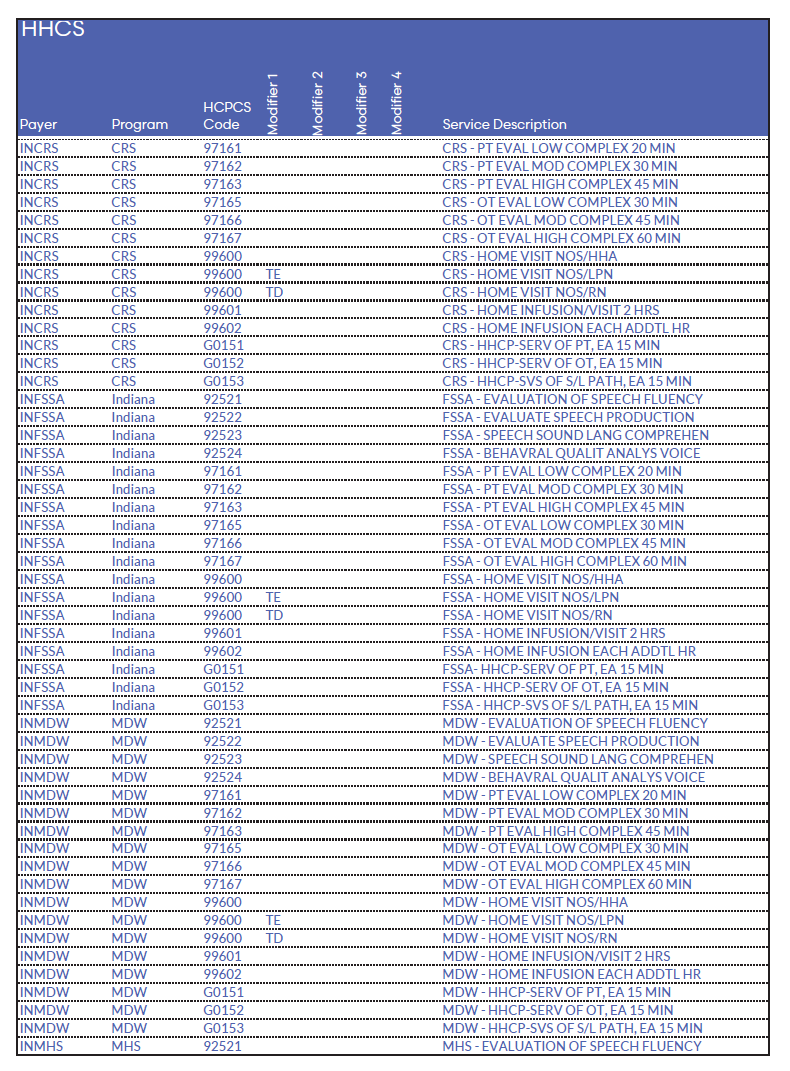
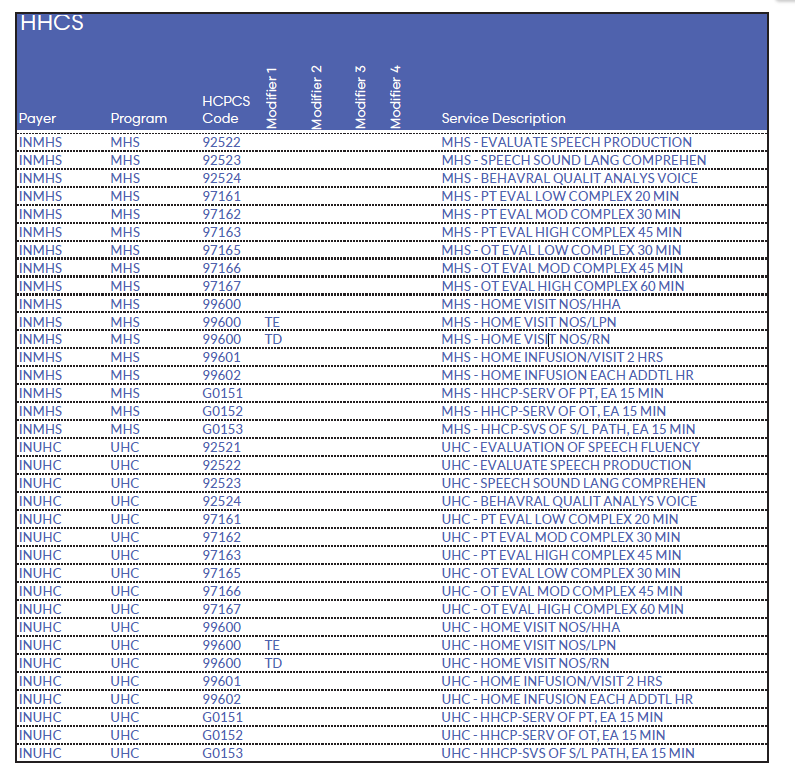
In other words, Ankota only exports the appropriate visits during billing completion. You can also manually export via the Visit Approval Dashboard.
After Indiana customers have data flowing through to Sandata, they will:
- Review rejected visit responses in the VAD as they come in
- Make corrections as needed
- Re-export data as needed
Testing
For Sandata, no state testing processes are required other than the initial Ankota testing process.
Pre-Billing
Successful billing starts at the beginning of the client's creation. The processes below will lead to successful billing.
Client Management
- Setting Authorized Service for Clients (entering authorizations)
- Schedule Visits - Calendar-Based Scheduling (or for those who prefer the classic approach, Creating Visits from Patterns)
Visit Management
- Caregivers complete visits
- Note: Missouri does not accept time sheets. Timesheets are used only for office keeping and are merely optional.
- Visits are approved automatically or visits are approved by office
- More specifically, ensure visits are closed, then review and clear the Visit Approval Dashboard
- Note that Sandata visits require Reason Codes to be applied as needed in the Visit Approval Dashboard
- (We recommend using the Approval Assistant)
Error Prevention
- Watch your warnings on the Action Center (for missing auths, primary diagnosis codes, IDs, etc.) and address as needed
- Watch your warnings on the Visit Approval Dashboard and address as needed
- Ensure that name spellings, First Name and Last Name, Medicaid IDs, SSNs, and DOBs are entered correctly
- Set reason codes as needed during VAD approval
- Finally, manage your rejections
The Landing Dashboard will highlight necessary actions, including managing visits as needed.
Billing/Payroll Overview
Billing
To bill, perform your usual visit review and billing processes in Ankota. In other words, after ensuring visits are closed, reviewing the Visit Approval Dashboard, calculating billing, and completing draft invoices, you are ready to bill the state portal.
IMPORTANT NOTE: Completing your invoices also AUTOMATICALLY pushes out your visit data to Sandata. If you do not complete billing in Ankota, you will need to manually export your data via the Visit Approval Dashboard's mass export function.
Remittance Advice Management (835s)
Remittance advice files, or 835s, are provided in response to filing Medicaid claims. Think of these like state receipts of payments. These files can be uploaded to Ankota for an automatic application of payments in the A/R records. For guidance on this process, see the links below.
- Process Remittance Advice (Upload 835 "receipts" received from MMIS into Ankota)
- Post Manual Payments
- Review Billing Reports — See also: Collections Report, Exceptions Report
Imported Response Files
Although Indiana's billing is not yet based on data delivered to Sandata, typically you will not receive imported response files until after you bill. For more information on this process, click the links below. (Remember, the state requires you to send successful data to Sandata.)
- Sandata Response Files (Overview)
Corrected Visits (Sandata)
When correcting visits, the errors generally fall into one of a few categories, each of which is managed differently. In general, fundamental errors require backing out billing in order to correct the visit, then re-invoice, whereas reason code or demographic information can typically be updated and then the visit can be immediately re-exported.
We recommend you use the Approval Assistant to simplify your visit corrections process. Please note you should ONLY use the Duration adjustments section to shorten visits if there are known, strict limitations on the allowed work duration for the selected visit type.
For more information on errors and how to manage them, see Managing Data Corrections.
Further Details
These additional resources may be of use to Indiana clients:
- The Ankota Training Overview, including videos
- Daily Adjustments
- Manual Visit Entry