Kentucky Workflow
Overview
(Private pay is generally self-regulating within the confines of state law and regulatory processes. This article focuses on Medicaid billing in the state of Kentucky.)
In the state of Kentucky, there are some unique billing processes. Medicaid visits must be completed using electronic visit verification (EVV), and these verified visits are required to be sent to the state's default EVV provider on a regular basis. For Ankota users, that means in addition to the regular EVV services Ankota provides, Ankota also delivers visit data to Therap to ensure the state's requirements are met.
Providers bill via 837s to KYMMIS, and all visit edits/approvals take place in Ankota.
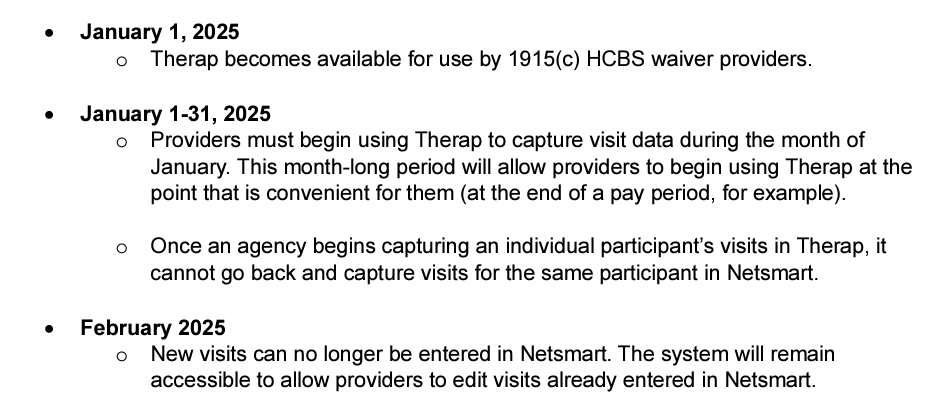
Kentucky transitioned to Therap (from Tellus/Netsmart) during the month of January 2025.
This article covers:
- Critical Pathway
- Set-up
- Therap Data Requirements
- Testing
- Pre-Billing
- Billing Management for Medicaid Visits
- Remittance Advice Management (835s)
- Corrected Claims
- Further Details
Critical Pathway
For a simple overview of key admin system maintenance, see the Kentucky Therap Critical Path PDF.
Set-up
Ankota users in Kentucky must register with Therap and complete 3 forms. This registration ensures Therap will accept customer data and provides users a Therap log-in to double-check data success. Internally, Ankota users are automatically set up for delivery of EVV visit data to the state as part of implementation.
Therap 3rd Party EVV Registration
To: KYSUPPORT@therapservices.net and copy info@therapro.com
Subject: Request for EVV Vendor Certification (Ankota)
Body:
- Agency Name
- Agency Provider ID Number(s)
- Agency NPI
- Agency Contact Person
- Agency Contact Title
- Agency Contact Email
- Agency Contact Phone
- Agency Street Address
- Agency City
- Agency State
- Name of EVV System Vendor/Company - Ankota LLC
- Name of EVV System/Solution - Ankota
- EVV System Contact Name - Sharon Dodge
- EVV System Contact Email - sharon.dodge@ankota.com
- EVV System Contact Phone - 844-4-Ankota, extension 703
Once registered, Therap support will send three documents to complete:
- Therap End User Legal Agreement (EULA)
- Business Agreements
- Aggregator Attestation
Reference: https://www.therapservices.net/kentucky-evv-aggregator-implementation-request-form/
Data Requirements
Kentucky collects the following information (this must be added to the system prior to data delivery):
Clients
- First Name, Last Name
- Date of Birth
- Medicaid ID
- Address (some additional information will be sent if entered, such as phone number; entries must be in a valid format)
Caregivers
- First Name, Last Name
- Mandated Staff ID (auto-created by Ankota)
- SSN (used to create the Mandated Staff ID)
Testing
No state or Therap testing processes are required, although Therap credentials must be provided to Ankota. Organizations may begin billing KYMMIS per the directions below once they have been configured to do so by their Ankota specialist.
Pre-Billing
Note: Providers bill via 837s to KYMMIS, and all visit edits/approvals take place in Ankota.
Successful billing starts at the beginning of the client's creation. The processes below lead to successful billing.
Client Management
- Setting Authorized Service for Clients (entering authorizations)
- Schedule Visits — Calendar-Based Scheduling (or the classic approach, Creating Visits from Patterns)
Visit Management
- Caregivers complete visits or timesheets are entered manually through the office
- Visits are approved automatically or by office
- Ensure visits are closed, then review and clear the Visit Approval Dashboard
- Therap visits require coding if they are missing critical EVV data such as a missing clock-in, clock-out, GPS issue, or telephony issue (some coding options have been deactivated as they are inapplicable in the Ankota system)
- Cost sharing / copay functions can be managed in Ankota if desired — request configuration if the feature is not available
- 0.5 miles (for both clock-in and clock-out) is the maximum distance from expected service address
Error Prevention
- Use the Approval Assistant
- Ensure client/caregiver data accuracy (name spellings, First Name/Last Name separation, Medicaid ID, SSNs, and DOBs)
- Watch for rejections and address them as needed
- The Landing Dashboard highlights necessary actions, including managing visits and rejections
Billing Management for Medicaid Visits
Note: Providers bill via 837s to KYMMIS, and all visit edits/approvals take place in Ankota.
To prepare to export an EDI file for billing, perform the usual visit review and billing processes in Ankota. After ensuring visits are closed, reviewing the Visit Approval Dashboard, calculating billing, and completing draft invoices, export the Merged Health Care Claim.
To file the claim, upload the 837 claim to KYMMIS. Remittance advice files (835s) are provided in response to filing Medicaid claims (think of these as state receipts of payments). These files can be uploaded to Ankota for automatic application of payments in the A/R records. KYMMIS makes 835s available.
Related steps:
- Calculate Billing
- Complete the Billing Draft
- Export the Merged Health Care Claim
- Process Remittance Advice (upload 835s received from MMIS into Ankota)
- Post Manual Payments
- Review Billing Reports (see also: Collections Report, Exceptions Report)
Kentucky Medicaid pays weekly.
Remittance Advice Management (835s)
Remittance advice files (835s) are provided in response to filing Medicaid claims. These files can be uploaded to Ankota for automatic application of payments in the A/R records. KYMMIS makes these available.
- Process Remittance Advice (upload 835s received from KYMMIS into Ankota)
- Post Manual Payments
- Review Billing Reports (see also: Collections Report, Exceptions Report)
Corrected Claims
Generally, claims corrections are handled one of two ways:
- Update the claims in Ankota and re-send
- Update the claims in the location where they were sent (such as Tellus/Netsmart or the state KYMMIS portal)
For KYMMIS billing, correct claims as needed by canceling the invoices and associated payrolls, correcting the data, and rebuilding the invoices for upload.
Further Details
- For a more detailed walkthrough on Therap, see the Therap walkthrough.
- Ankota Training Overview (including videos)
- Daily Adjustments
- Manual Visit Entry