Split at Midnight on Closed/Approved for Billing - Daily & Weekly
Overview
Ankota allows for several billing & payroll options for visit splitting:
- No splitting (bill and pay all visits in the week, even those that crossed over midnight into next week)
- Split at midnight daily
- Split at midnight end of week
Generally these options are set up during implementation; see below for more.
Split at Midnight (Weekly)
Some customers need to split visits at midnight at the end of the week to ensure a clear separation between weeks for both billing and payroll. (This is most common for private pay.)
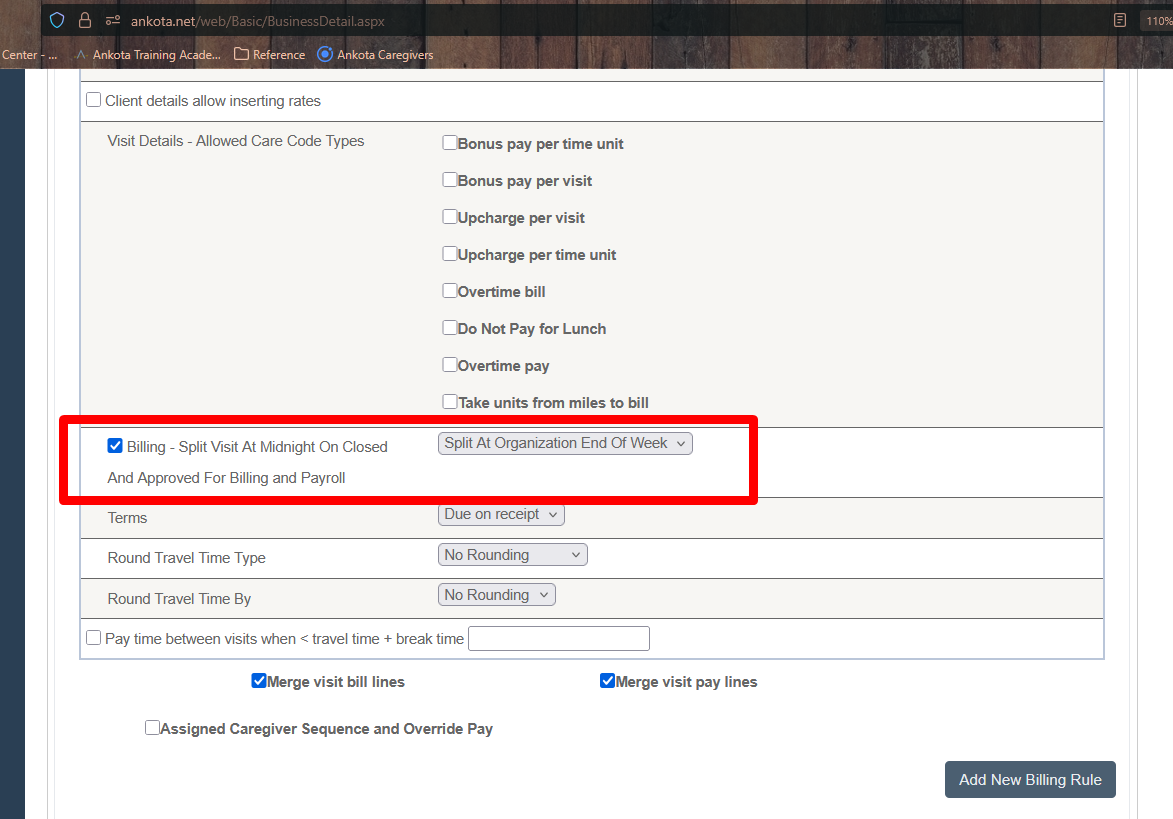
Generally, the only configuration required is to set the Organizational Detail Billing Configuration setting to "Billing - Split Visit At Midnight on Closed and Approved for Billing and Payroll (Split At Organization End of Week)."
Split at Midnight (Daily)
Some states will not allow visits that cross the midnight hour to be billed as one visit. For these states, your system can be configured to split the visit in two for billing upon visit approval.
Contact Support if you would like this addition, as there are several supporting configurations required, beginning with setting the Organizational Detail Billing Configuration setting to "Billing - Split Visit At Midnight on Closed and Approved for Billing and Payroll (Split Daily)."
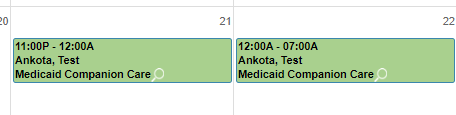
After configuration, visits will split in two upon visit approval. (NOTE: there is an option to split at 1159 as well.)

The clients' schedule board will also then reflect 2 visits:
This function is typically configured as part of your implementation based on your billing needs, but if your requirements have changed, reach out to Support to request your adjustment.