Care Codes in Ankota
Overview
Care codes in Ankota are used to make alterations in billing and payroll. These codes can be applied to visit types, individual visits, and clients.
Normally, care codes are designed and assigned by an Ankota specialist. This article breaks down the options Ankota provides for organizations that wish to better understand or manage their own care codes. The examples assume that units are in hours. If units are in 15-minute intervals, care codes would be designed differently.
Sections in this article:
- Care Codes and Visit Types
- Care Codes and Individual Visits
- Care Codes and Clients
- Care Codes and Caregivers
- Creating a Care Code
Related billing and payroll topics:
- Setting Bill Codes / Bill Rates
- Setting Pay Rates
- Adding a Billing Adjustment
- Adding a Payroll Adjustment
- Assigned Caregiver Pay Rates
Care Codes and Visit Types
Care codes are most often used on specific visit types. When applied to a visit type, they alter the financial rules associated with that visit type.
For example, if an overtime care code is created and applied to a Personal Care - IHS visit type, all caregivers working that visit type will receive overtime after 40 hours. Typically, if a company pays overtime, overtime is assigned to all visit types that bill by the unit (as opposed to billing by visit).
Overtime Care Code + Visit Type = Overtime Paid On This Visit Type
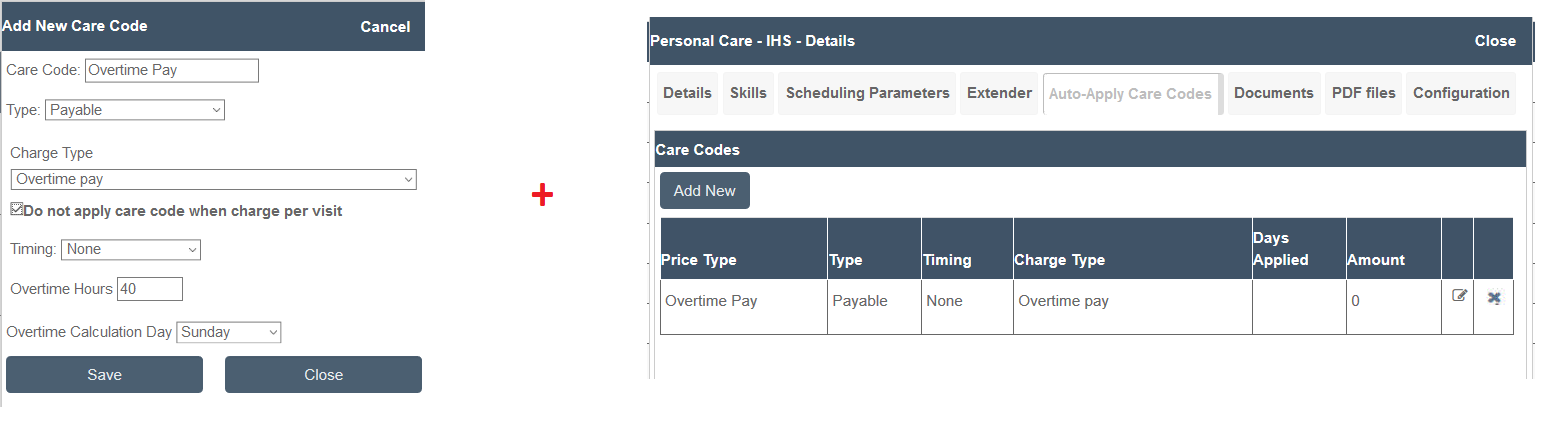
Most often, visit type care codes are created for:
- Private Pay client billing upcharges for weekends, overnights, and/or holidays
- Additional caregiver pay for weekends, overnights, and/or holidays
- Caregiver overtime or double time
- Limiting the maximum billable or payable time based on the authorization
For holiday care codes, holidays must be defined in Ankota so that special rates are applied on the appropriate holidays. See Adding Calendar Holidays for more information.
Care Codes and Individual Visits
Note: This feature must be turned on by Ankota. Request it if desired.
Care codes are usually placed on individual visits when an incentive is needed to get the visit covered. For example, if a client lives in a distant area and their regular caregiver is unavailable, a one-time $1/hour bonus may be offered and applied to the individual visit.
Bonus Care Code + Visit = Bonus Paid On This Specific Visit (One-Time)
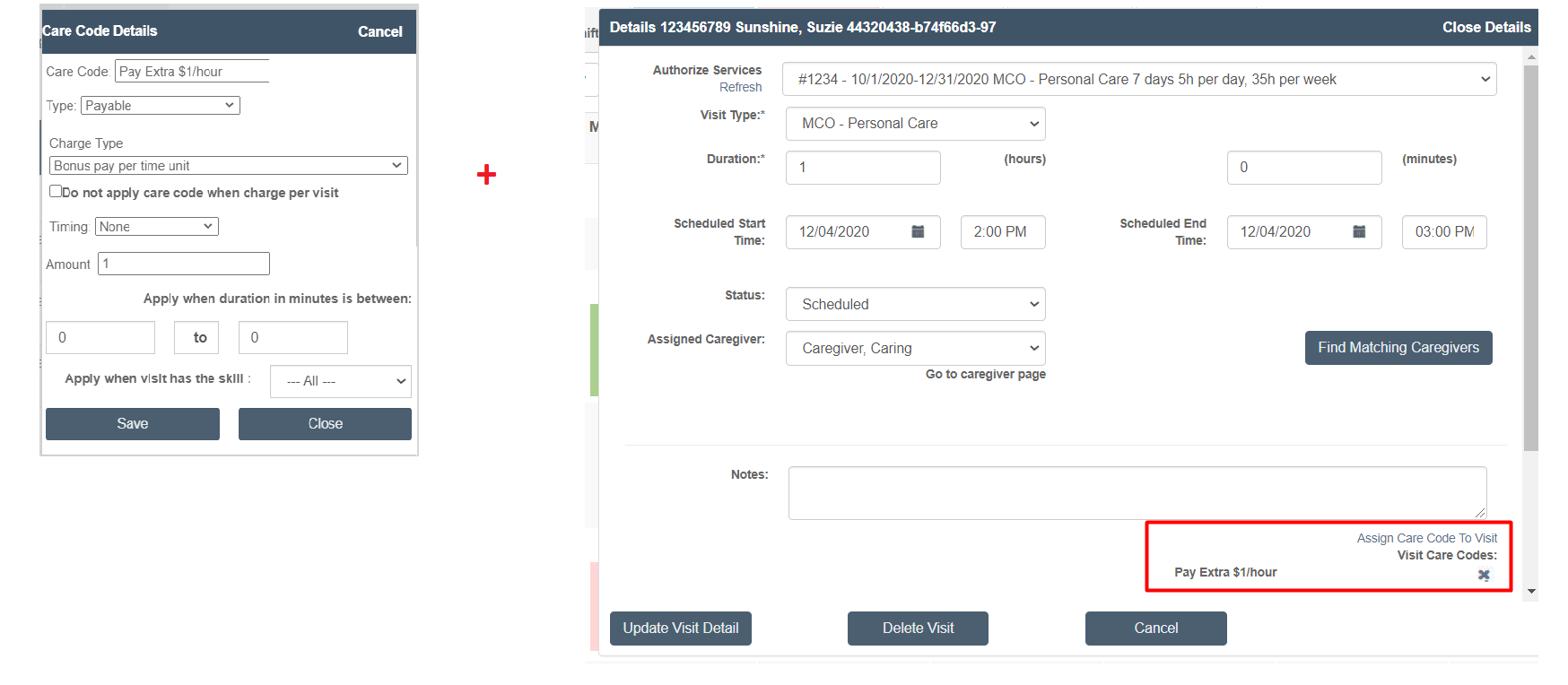
Care Codes and Clients
Care codes are placed on client care code tabs for a variety of reasons, including:
- A courtesy discount (typically assigned to grandfathered private pay clients)
- An upcharge for clients due to challenging coverage options (for example, an hour away from the closest caregiver)
- A pay bonus incentive for caregivers due to challenging circumstances (for example, passing along the upcharge to the caregiver for a long drive)
- Multi-client upcharges
- Multi-client pay bonuses
For example, a private pay client may receive a courtesy discount of -$4/hour because they have been with the agency for years at the old rates. Create a discount care code and apply it to the client. (This is listed as an upcharge, but the amount is negative, so it acts as a discount. The code is also labeled Discount to avoid confusion.)
Courtesy Discount Care Code + Client = Discount Applied to All Services for Client
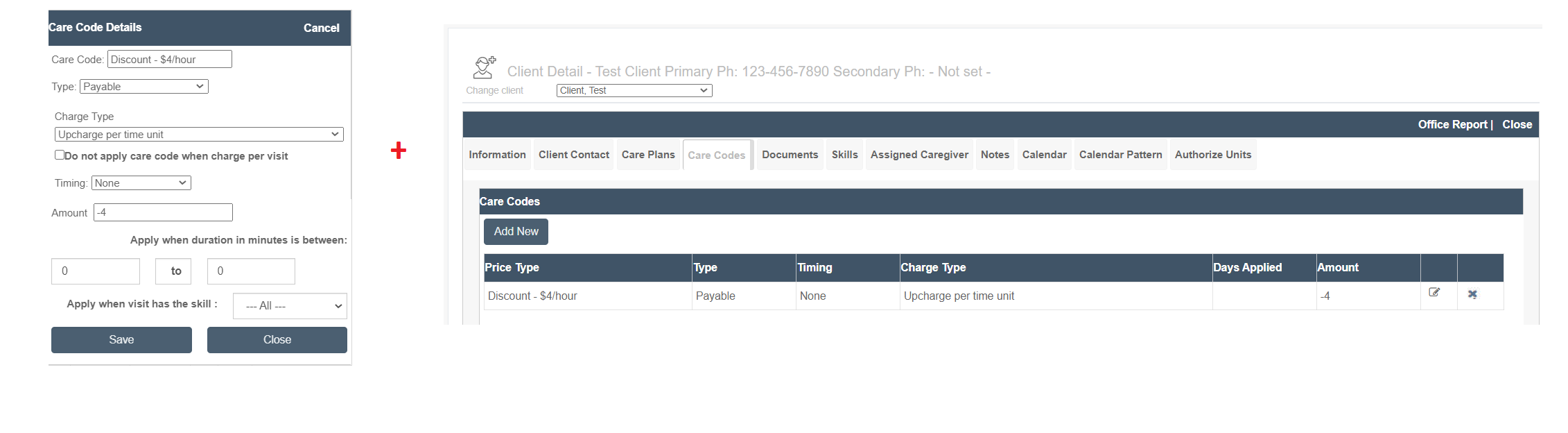
Care Codes and Caregivers
Care codes are generally not used for caregivers. A different function is used when a specific pay rate is needed for a single caregiver working for a single client. See Assigned Caregiver Pay Rates for more information.
Creating a Care Code
To create a care code:
- Click Settings
- Click Organization Detail
- Click the Billing Configuration tab
- Click the Care Code subtab
- Click Add New
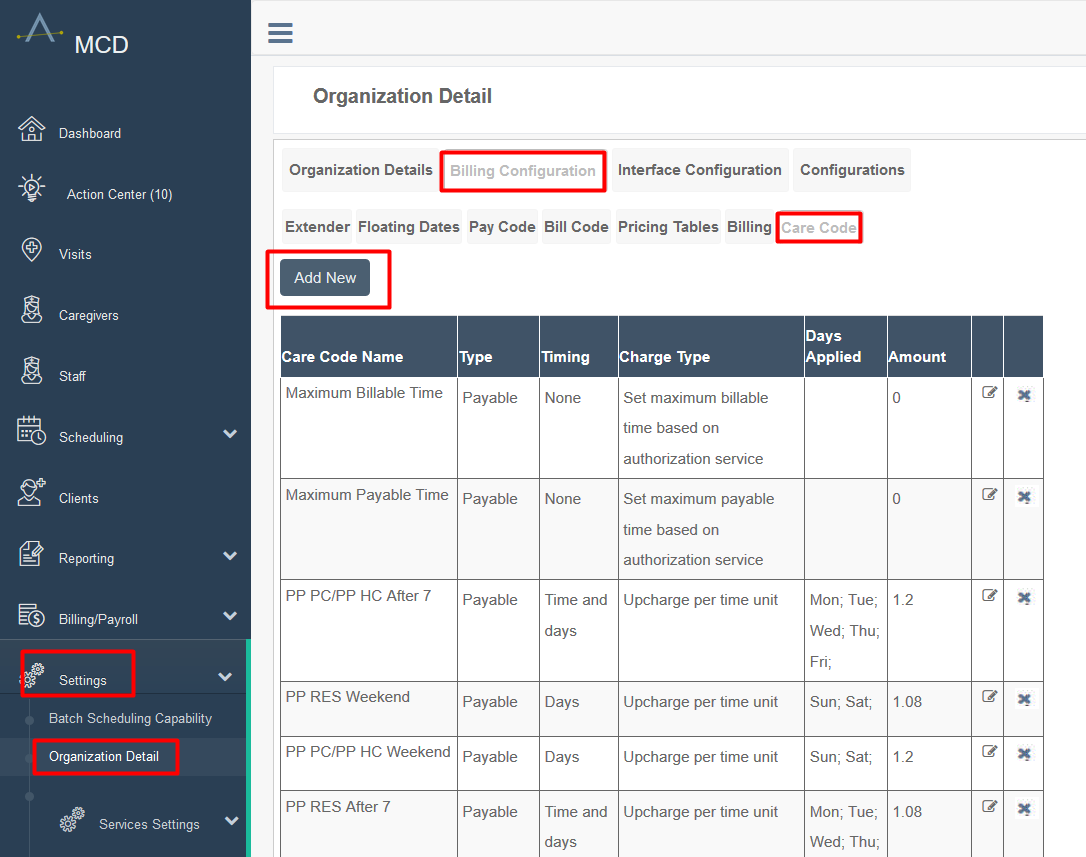
Once the care code creation window is open:
- Define the care code name
- Define the care code type (usually payable)
- Select the charge type (varies)
- If needed, check the box next to Do not apply care code when charge per visit
- Select the timing
- Select the amount
- Select the days/times if needed
- Apply a skill or duration if needed
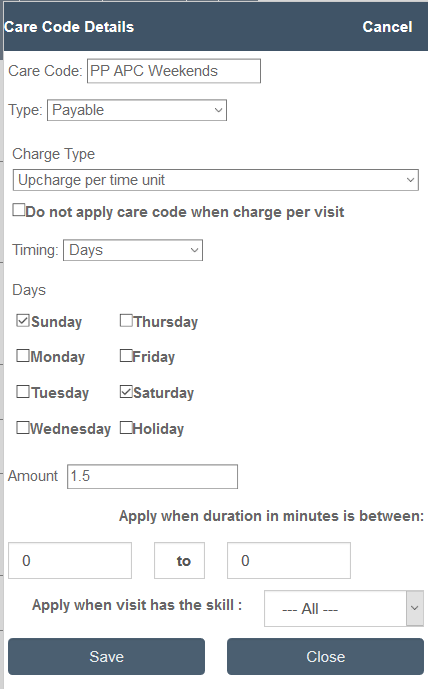
Care code creation requires experience in the system. To build a new care code without full certainty of the best charge type or other options, reach out to an Ankota specialist for assistance.
Commonly Used Care Codes
Commonly used care codes include:
- Upcharges to bills for certain time periods, such as holidays, weekends, or overnights
- Shift differentials or overtime for certain time periods, such as holidays, weekends, or overnights
- Hourly-based or visit-based pay bonuses for caregivers picking up unwanted shifts (applied by admin on a visit-by-visit basis)
- Auto-reason coding of 2nd address approval (primarily Georgia Medicaid clients at this time - 9134)
- Travel pay adjustments
- Maximum payable times
- Using a bill or pay rate for specific durations
- Sleep time
- Exempting a visit from overtime
- Discount hours creates TWO rates: usually used to create a higher initial rate and then a discounted rate after a certain number of hours
- Can also be used to create a higher secondary rate, although this is more rare
- Can be applied to a visit type or directly to a client
Contact Ankota support to have one of these configured.