Historic Visit Cleanup with the Approval Assistant
Overview
Sometimes, agencies get behind on visit management, often due to administrative turnover. This is particularly the case if you are delivering your visits to a state aggregator such as Sandata, HHAX, Authenticare, Therap, or Netsmart.
If your agency has gotten significantly behind in visit management, you can easily catch up with the Approval Assistant following the step-by-step directions below.
Day One: Manage Needs Action Visits with the Approval Assistant
- On the Visit Approval Dashboard, filter for Needs Action visits back to your data delivery start date (for example, Missouri requires visits back to 11/8/2021).
- Select all visits.
- Click the Approval Assistant button.
- Clean up Data Entry errors.
- Clean up Reason Code errors.
- Evaluate visits that went excessively long, contact caregivers and review notes, and make decisions.
- Approve the visits.
- Export all the visits.
Note: The Approval Assistant will ONLY approve visits with no red warnings left. If you have too many visits with red warnings left, contact Support to add additional resolution options.
Day Two: Manage Rejected Visits
- On the Visit Approval Dashboard, filter for Rejected visits back to your data delivery start date.
- Select all visits.
- Click the Approval Assistant button.
- Clean up Data Entry errors.
- Clean up Reason Code errors.
- Approve the visits.
- Export all the visits.
Day Three: Manage Remaining Rejected Visits
- On the Visit Approval Dashboard, filter for Rejected visits back to your data delivery start date.
- Walk through individual errors and correct them.
- The majority of errors will probably be visits due to rejected clients or caregivers whose profiles were wrong or incomplete. If that's the case, fix the error in the caregiver or client profile.
- Export all the corrected visits (including the visits of any client/caregiver whose profile was corrected).
If there are over 100 remaining visits after resolving client/caregiver errors, contact Support. Ankota can evaluate the errors and offer options to improve efficiency.
Additional Resolution Options
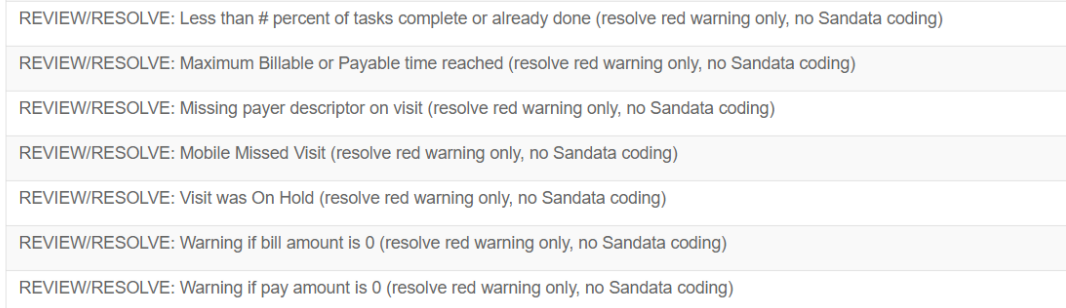
Ankota has expanded the Approval Assistant Coding options section to include special resolution options. These options flag visits with specific red warnings so it's easier to review the visits as a category, even though they don't need coding. This can make it faster to resolve issues. If you are struggling with too many unmanaged visits with warnings or rejections, contact Support to add additional resolution options.
Special option examples:
Related Training
Review the seminar Data Management in Brief for additional guidance on data management.